
Hyper-V in GitHub Actions: A Fresh Azure VM per Job
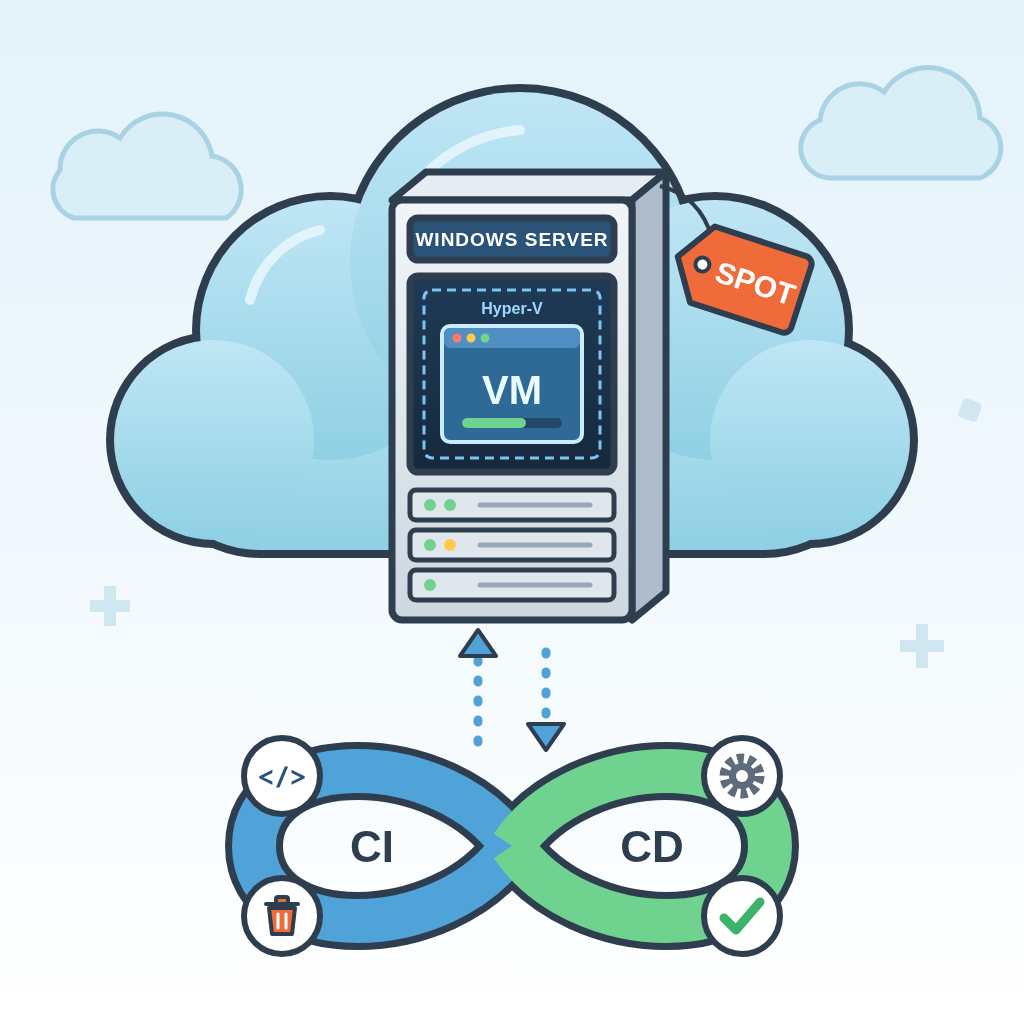
My VM tool Sailwright can only be tested if the automated build and test environment (CI) itself starts virtual machines. The standard runners of GitHub Actions don't officially support that. So a small Azure Function starts a fresh Windows VM for every test run and deletes it afterwards. When idle, this setup costs about €2.50 a month, plus about 14 cents per build.
Summary
I'm developing Sailwright, a tool that builds and tests real Windows, Linux and macOS VMs. The Windows builds are created with Hyper-V, Microsoft's hypervisor built into Windows. To test them automatically, the CI has to start a VM inside a VM (nested virtualization). The GitHub-hosted runners, the machines CI jobs run on by default, don't officially support that.
A self-hosted runner is a runner on your own infrastructure. If it runs as a Windows VM around the clock, it costs money even when nothing is being built. The VM size used here is Standard_D4ds_v5 with 4 vCPUs and 16 GB of RAM. As a regular Windows VM in the Azure region East US 2, it costs about €260 a month. As a discounted Spot VM, it's about €110 at the current price. The disk comes on top in both cases.
That's why a small Azure Function starts a dedicated Windows VM with Hyper-V for every CI job. An Azure Function is code that Azure only runs, and bills, when it is called. I call this function the “broker”. It uses Spot VMs, heavily discounted VMs that Azure can reclaim when it needs the capacity. The VM takes exactly one job; afterwards the broker deletes it along with its disk, network and IP address.
GitHub issues every workflow run a short-lived, signed token (GitHub OIDC). I configured Azure to trust these tokens from my repository. As a result, the repository holds no stored Azure credentials.
When idle, the platform costs about €2.50 a month. Almost all of that goes to storage, such as the prepared VM image (golden image) that every runner VM starts from. Each build adds about 14 cents.
This article covers:
- why a VM tool needs nested virtualization in CI
- how the broker and the runner VMs work together, and how the golden image keeps itself up to date
- where it got tricky: enabling Hyper-V on a cloud VM
- the security model and which hardening steps are still open
- how the bill adds up and which mistakes it uncovered
Testing a VM Tool Means the CI Needs a Hypervisor
Sailwright combines Ansible with tools that build and provision VMs. This way, the same playbooks can be tested against real macOS, Linux and Windows targets before they land on a developer's machine. Technically, Sailwright is a Go-based CLI. It drives Packer and Vagrant as well as Hyper-V, QEMU or VirtualBox to build and provision short-lived test VMs.
That's exactly what makes the CI pipeline complex: if you want to test a tool that builds VMs, you need a CI runner that runs a hypervisor itself. The two tests that decide on a Windows release actually start a nested VM, a VM inside the runner VM:
TestBuildHypervWindows11Amd64OnWindows– a complete Hyper-V build of Windows 11 with Packer.TestRunHypervVagrantDeployOnWindows_Smoke– deploys the resulting.boxto Hyper-V with Vagrant.
The Packer template for this installs Windows 11 in a Hyper-V VM. The template then turns the result into a Vagrant box. The “Default Switch” is created by the runner's setup script (see below).
# build/packer/windows/windows11-on-windows-hyperv.pkr.hcl (gekürzt)
source "hyperv-iso" "win11" {
  # ...
  switch_name        = "Default Switch"
  # ...
  enable_secure_boot = true
  generation         = 2
  enable_tpm         = true
  # ...
}
Source: windows11-on-windows-hyperv.pkr.hcl:58
According to GitHub, nested virtualization on the GitHub-hosted runners is technically possible, but not officially supported and explicitly experimental (GitHub docs). That isn't enough for reliable CI. So I need a self-hosted runner on a VM size that supports nested virtualization. On Azure, for example, that is the VM family Dds_v5; I use Standard_D4ds_v5. Azure is a good fit here: these VMs are available as cheap Spot VMs, and signing in from GitHub works without stored Azure secrets.
There are ready-made solutions for runners that start per job and disappear afterwards. None of them fit, though. Canonical's provisioner follows the same pattern on Azure, but it is archived. The Terraform module terraform-aws-github-runner targets AWS.
When I started in December 2025, Hyper-V in an AWS VM only ran on expensive bare-metal instances. Support for regular instances only arrived in February 2026 (AWS announcement). Even today, AWS wouldn't be cheaper. AWS's own Spot price list shows Windows costing about $0.18 more per hour than Linux for comparable sizes (m6i and m7i, us-east-1, October 2026). So with Spot, the license surcharge applies in full. Based on that, I estimate the Windows Spot price for an m8i.xlarge at about $0.28 (roughly €0.25) per hour. The Azure VM costs about €0.15 per hour as a Spot VM. Per build, that would be just over 20 cents instead of about 14.
Above all, I didn't want to give a third-party solution far-reaching permissions in my cloud environment. With my own broker, I keep full control and can build in the workarounds that clean automation needs, such as for the Hyper-V setup further down.
A Fresh VM per Job: Broker, Runners and Flow
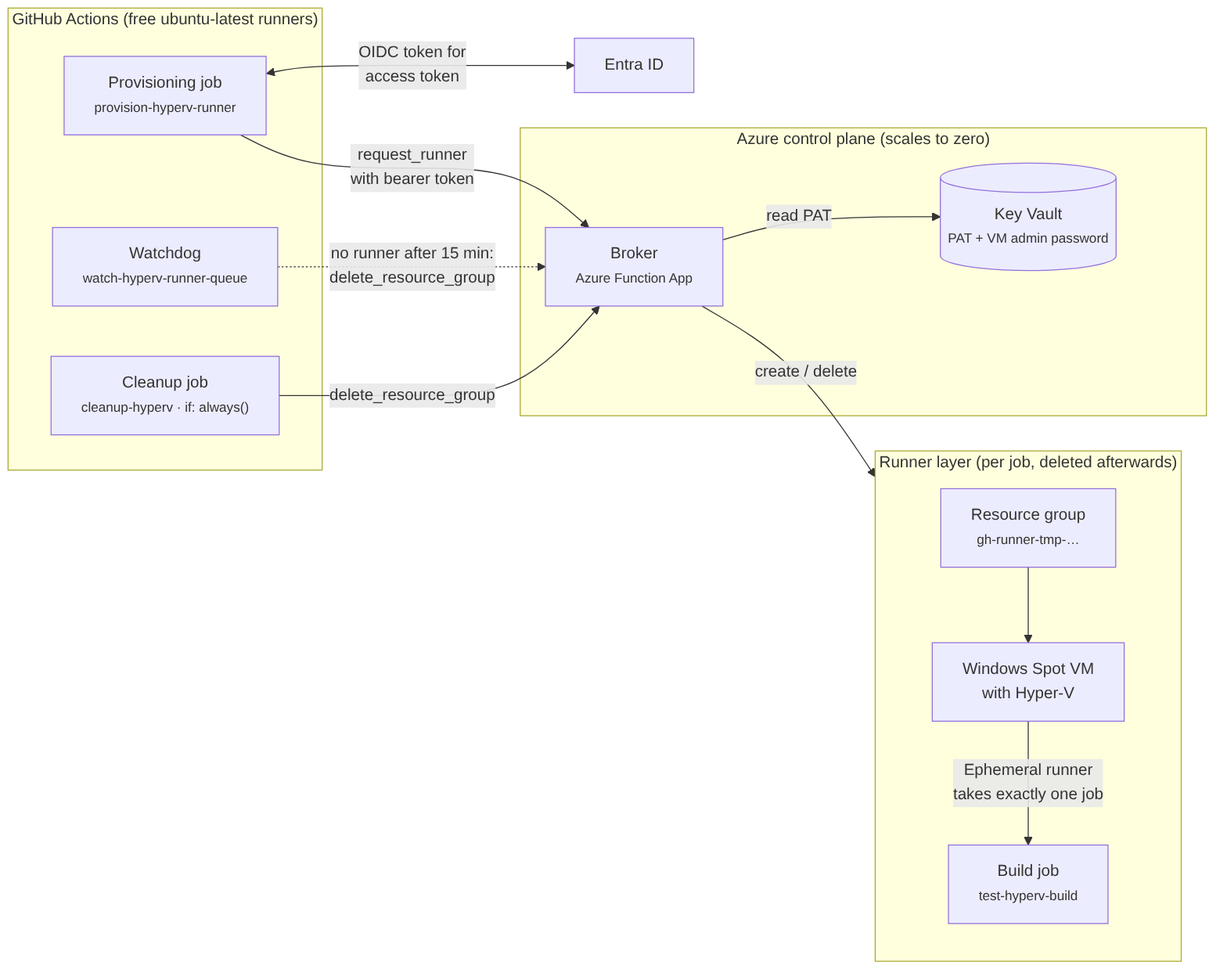
The platform consists of two parts. The control plane exists permanently and costs little. It includes an Azure Function App in Python on the Consumption plan Y1 (billed per execution), a Key Vault, a storage account and Application Insights. I set them up once with Terraform (manager.tf). The Function App runs the broker with exactly two HTTP routes: request_runner fetches a registration token for the runner and creates the VM. delete_resource_group deletes everything again.
The runner layer exists only for the duration of a job. For each request, the broker uses the Azure SDK to create a dedicated resource group, a kind of folder for Azure resources that can be deleted as a whole. It holds the VNet, NSG, NIC, public IP and finally the Spot VM (function_app.py from line 230).
Golden image. To keep the paid VM from running long, I bake the runner agent and toolchain into an image with Packer in advance. On first boot, the VM then only has to enable Hyper-V and register instead of installing everything. The image is generalized with Sysprep, which strips all machine-specific data. That's why every runner starts clean (windows-azure-gh-runner.pkr.hcl).
A CI Run from Start to Finish
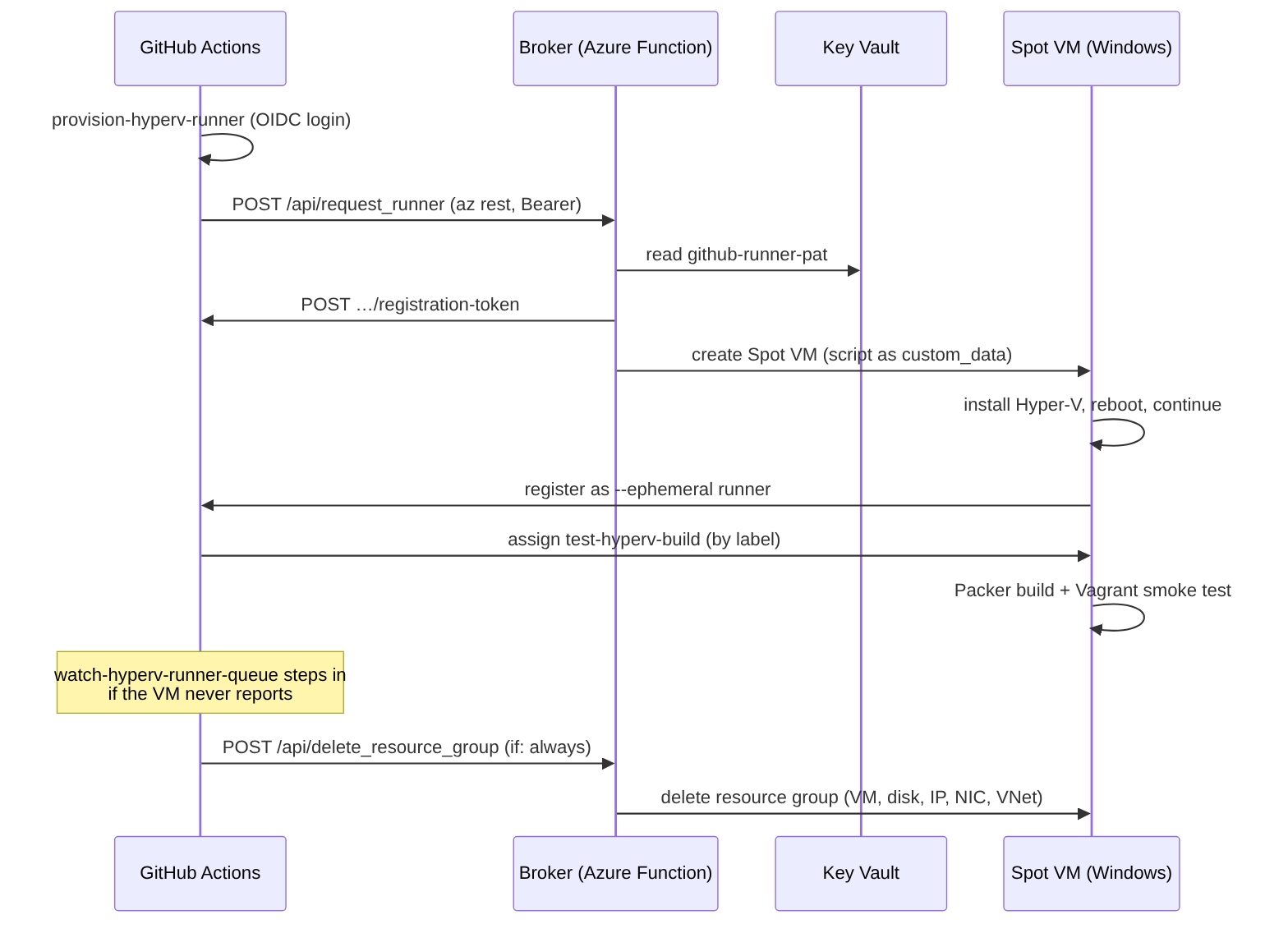
The workflow itself requests the VM from the broker, using az rest:
# .github/workflows/test-build-windows.yml
- name: Request Windows Runner VM
  run: |
    az rest \
      --method post \
      --uri "https://${{ secrets.FUNCTION_APP_NAME }}.azurewebsites.net/api/request_runner" \
      --resource "api://${{ secrets.AZURE_CLIENT_ID }}" \
      --body '{
        "repo": "${{ github.repository }}",
        "resource-group": "${{ steps.vars.outputs.resource-group }}",
        "runner-name": "${{ steps.vars.outputs.runner-name }}",
        "virtualization-flavor": "hyperv"
      }'
Source: test-build-windows.yml:58
After that, the runner labels alone make sure that the build job runs only on this freshly started VM. The last label is the runner's name, which the provisioning job generated specifically for this workflow run. This way, a job can't accidentally grab the VM of another run. The label alone doesn't protect against deliberate attempts; more on that in the section on forks.
# .github/workflows/test-build-windows.yml
runs-on:
  - self-hosted
  - Windows
  - azure
  - nested
  - "${{ needs.provision-hyperv-runner.outputs.runner-name }}"
Source: test-build-windows.yml:121
In practice, it takes 5 to 8 minutes for the runner to be ready. During that time, the VM boots, enables Hyper-V, reboots and registers. The actual build then takes about 40 minutes.
Two jobs make sure no VM is left over afterwards:
- Cleanup job. It runs with
if: always(), so even after a failure or cancellation, and callsdelete_resource_groupto remove the entire resource group with its VM, disk, public IP, NIC and VNet. - Watchdog. It runs in parallel on a runner with the label
ubuntu-latest, checking every 30 seconds whether the build job has started. If the job waits longer than 15 minutes for its runner, the watchdog deletes the resource group and cancels the workflow run.
If the build itself hangs, the job's timeout kicks in after 60 minutes, and the cleanup job cleans up.
The Golden Image Rebuilds Itself
I used to build the golden image by hand with a script. Something fell through the cracks: Renovate automatically bumps the version of the GitHub Actions runner in the repository, but nobody built a new image from it. That is now handled by the workflow build-azure-runner-image.yml. It rebuilds the image:
- on every push to
main, if it changes the Packer template or the Windows setup scripts, which includes Renovate's runner updates - every month on the 15th, after Patch Tuesday, so that Windows updates get into the image
- on demand
Pull requests only validate the template; they never build.
This workflow is allowed to replace the image that every runner starts from. That's why it is tightly secured:
- Its own identity. It signs in with its own Entra app,
gh-actions-image-builder. Its federated credential trusts only the branchmain, so a pull request can't swap the image. - Permissions on two resource groups only. The app is
Contributoron the resource group holding the image and on a separate one for Packer's temporary build resources. It has no permissions on the subscription as a whole. - WinRM from the runner only. The temporary build VM accepts WinRM connections only from the runner's public IP.
- Tokens that last long enough. The Azure CLI token from
azure/loginexpires after about an hour, but a Windows build can take longer. That's why Packer signs in to Azure itself via GitHub OIDC and fetches a new token when needed.
I accept one trade-off deliberately: the workflow replaces the managed image directly, without versions. Because of the -force flag, Packer deletes the old image right at the start of the build. Until the new one is ready, runner requests fail. That takes about 25 minutes, and in the worst case until the job times out after 150 minutes. If the build fails, there is no image at all until a new build succeeds. An Azure Compute Gallery with versioned images would solve both problems. For this project, though, it is more effort and more cost than necessary.
The workflow has been running since October 14, 2026. The first build after the merge rebuilt the image in about 25 minutes, and the first scheduled run followed on the 15th.
Hyper-V on a Cloud VM Takes More Than a Reboot
This was the part where I learned the most lessons the hard way. The first version only enabled Hyper-V and rebooted. That was enough for a manual demo, but not for reliable CI. The Hyper-V role requires a reboot that the runner has to survive. And the nested VMs need their own network with NAT and DHCP. “Hyper-V is installed” is simply not the same as “a nested VM boots and gets onto the network”.
Everything needed is in runner-setup.ps1. The broker hands the script, base64-encoded, as custom_data to the VM.
1. Install the Hyper-V role. Server and client editions of Windows need different commands for this. So the script first checks which edition it is running on (runner-setup.ps1:89).
2. Survive the reboot. The script creates the scheduled task ContinueRunnerSetup that runs as SYSTEM at startup. Then it reboots the VM. After the reboot, the task resumes the setup where it left off (runner-setup.ps1:160).
3. Create an internal switch for the nested VMs. This is the network the Windows 11 VM from the Packer build boots into later:
# runner-setup.ps1 (gekürzt)
# Create default virtual switch with NAT network (required for nested virtualization)
$existingSwitch = Get-VMSwitch -Name "Default Switch" -ErrorAction SilentlyContinue
if (-not $existingSwitch) {
    # ...
    New-VMSwitch -Name "Default Switch" -SwitchType Internal -ErrorAction Stop
    # ...
}
Source: runner-setup.ps1:184
4. Set up a DHCP server for this switch only. It is bound to the Default Switch adapter and separated from all other adapters. That way it hands out addresses only to the nested VMs and doesn't get in the way of the Azure VNet's DHCP (runner-setup.ps1:241).
5. Grant the runner account permissions and register it. The account is added to the local groups “Administrators” and “Hyper-V Administrators”. It then registers as an ephemeral runner, a runner for exactly one job:
Add-LocalGroupMember -Group "Administrators" -Member $RunnerUser -ErrorAction SilentlyContinue
Add-LocalGroupMember -Group "Hyper-V Administrators" -Member $RunnerUser -ErrorAction SilentlyContinue

.\config.cmd `
  --url $RepoUrl `
  --token $RunnerToken `
  --name $RunnerName `
  --labels windows,azure,nested,$RunnerName `
  --ephemeral `
  --unattended `
  --runasservice `
  --windowslogonaccount $RunnerUser `
  --windowslogonpassword $Password
Source: runner-setup.ps1:285
No Azure Secrets in GitHub: OIDC, Two Checks, Isolation per Job
The principle: no Azure secrets in GitHub, and several layers of protection in a row at the broker. The few long-lived secrets of the runner platform are stored exclusively in Azure. The Key Vault holds a GitHub personal access token (PAT) and the admin password of the runner VMs. The storage account's access key is in the Function App's settings. Otherwise, the only credentials the Windows workflow keeps in GitHub are those for the FTP server where the builds cache large files such as Windows ISOs.
Workload Identity Federation Between GitHub and Entra ID
GitHub Actions signs in to Azure with a short-lived OIDC token. Entra ID is Azure's identity service, formerly Azure AD. It exchanges the OIDC token for an access token (Workload Identity Federation).
Two federated credentials define which workflows may sign in this way. These are trust rules of the form “accept tokens from GitHub for this repository and this branch”. My two rules allow sign-in only for the branch main and for pull requests in this very repository:
# deployments/terraform/modules/azure_gh_runner/github_oidc.tf (gekürzt)
resource "azuread_application_federated_identity_credential" "gh_actions_github_actions" {
  # ...
  issuer  = "https://token.actions.githubusercontent.com"
  subject = "repo:${var.github_repository}:ref:refs/heads/main"
}
# ...und eine zweite für :pull_request
Source: github_oidc.tf:46
And pull requests from forks? The repository is public. GitHub advises against self-hosted runners in public repositories, because anyone can run code on the runners there via a pull request (GitHub docs).
Even so, a fork can't start a VM. The workflow runs on pull_request, not on pull_request_target. For pull requests from forks, GitHub then doesn't pass on any secrets (GitHub docs) and downgrades all write permissions to read (GitHub docs). For id-token there is no read level, so the run gets no OIDC token. Without an OIDC token, the provisioning job can't get past the broker.
One residual risk remains: a pull_request run uses the workflow file from the pull request. So a fork can send a job to the labels self-hosted, Windows, azure and nested directly. If a fresh runner VM is waiting for its job at that moment, the job from the fork could grab that VM. A repository setting guards against this: it runs workflows from forks only after approval. I set it to “Require approval for all external contributors” (GitHub docs).
At the workflow level, only the permission id-token: write is added. The watchdog job also gets actions: write, so that it can cancel a hung run. The login contains only IDs, no secrets:
permissions:
  contents: read
  id-token: write
# ...
- uses: azure/login@v3
  with:
    client-id:       ${{ secrets.AZURE_CLIENT_ID }}
    tenant-id:       ${{ secrets.AZURE_TENANT_ID }}
    subscription-id: ${{ secrets.AZURE_SUBSCRIPTION_ID }}
The IDs are still stored under secrets, so that GitHub masks them in the logs. They aren't secret: without a valid OIDC token from this repository, nobody can do anything with them.
Two Checks at the Broker
The broker is secured twice. First, EasyAuth v2, the built-in authentication of Azure App Service, rejects anonymous callers before any code runs (unauthenticated_action = "Return401"). Then the code itself checks the caller's claims, the details in the token, a second time. It does so even if EasyAuth has already approved the call. Tenant and audience (who the token was issued for) must match exactly. In addition, the caller's client ID or object ID must be on an allowlist:
# scripts/gh-runner-func/function_app.py
if tenant_id != allowed_tenant:   return False, "tenant not allowed"
if audience != allowed_audience:  return False, "audience not allowed"
client_allowed = client_id in allowed_client_ids
user_allowed   = user_object_id in allowed_user_object_ids
if not client_allowed and not user_allowed:
    return False, "caller not allowlisted"
Source: function_app.py:88
The broker is also not a receiver for the GitHub webhook workflow_job. The workflow calls it itself, which has two advantages. The attack surface is limited to two authenticated endpoints instead of a public webhook. And the provisioning is clearly visible in the workflow graph.
Short-Lived Registration Tokens
The broker reads the PAT from the Key Vault only to create a registration token for the runner. GitHub accepts this token for one hour only. It ends up exclusively on the VM, which is deleted along with its disk after the job (function_app.py:205).
For the Key Vault and Azure resources, the Function App uses a system-assigned managed identity. That is an identity Azure assigns to the service itself, with no password stored for it. Only the access key for its own storage account is still in the app settings.
Isolation per Job and a Small Attack Surface
Every job gets its own resource group, and the runner is registered with the flag --ephemeral so it takes one job and then signs off. Cleanup removes the entire group. But the broker only deletes a resource group if it meets two conditions. First, its name starts with gh-runner-tmp. Second, it carries the tag managed-by: gh-runner-broker, which the broker sets when creating it (function_app.py:406). This way it doesn't accidentally delete someone else's resource group that starts with gh-runner-tmp by coincidence. It doesn't yet fully protect against a caller who is out to do exactly that (see the open items below).
The broker also validates the caller's input before it reaches Azure or GitHub: the repository name with a regex, the virtualization type against an allowlist (function_app.py:19).
The runner VM's NSG, its set of firewall rules, contains no inbound rules at all. Inbound traffic from the internet therefore hits the default rule DenyAllInbound, and there is nothing in the VNet except the runner VM. The runner only needs outbound connections to GitHub. That's what its public IP is for.
What's Still Open Before Production Use
In the platform's first version, I deliberately took a few shortcuts. Some of them have been fixed since, others are still open. Anyone adopting the solution should close the open items before using it in production. Most of them are about narrowing permissions.
Still open:
- Narrow the broker's role further. The broker's managed identity has a custom role without data-plane permissions and without IAM. However, the role is assigned at the subscription level and allows
Microsoft.Compute/*andMicrosoft.Network/*. Through compute actions such as Run Command or exporting a disk, it can therefore still get at the contents of every VM in the subscription. It could be narrowed with individual actions or with a separate subscription just for the runners. - Narrow the GitHub identity. The app the workflows use to sign in via OIDC still has
Contributoron the Function App. This would let workflows onmainand in pull requests change the broker's code and settings. The app doesn't need that to call the broker. - Storage access via managed identity. The Function App still accesses its storage account with the access key. Setting
storage_uses_managed_identity = truewould remove this stored credential. - Runner account without admin rights. The runner account is a local administrator. Whether the “Hyper-V Administrators” group alone is enough remains to be checked.
- One password per VM. All runner VMs get the same admin password from the Key Vault.
- Verify the certificate during the image build. Packer does talk to WinRM over HTTPS (
winrm_use_ssl = true), but because ofwinrm_insecure = trueit doesn't verify the certificate. The build VM is short-lived, and in the new build workflow WinRM is reachable only from the runner's IP. A verifiable certificate would still be cleaner. - Don't take over existing resource groups.
request_runnercreates the resource group withcreate_or_updateand sets the tagmanaged-by, even if the group already exists. A caller on the allowlist could use this to first tag someone else's resource group with the prefixgh-runner-tmpand then have it deleted.request_runnershould abort if the group already exists. - Keep tag permissions tight. The tag check on deletion only protects as long as no other identity can set the tag
managed-byon someone else's resource group.
Already done:
- No RDP from outside. TCP 3389 is no longer reachable from the internet. For a debug session, Azure Bastion (access via the Azure portal) or just-in-time access (the port opens only briefly on request) could be used. Neither is set up, and both cost extra.
- No more Contributor role for the broker. Instead of
Contributoron the entire subscription, its managed identity has the custom role described above. - Purge protection in the Key Vault. Secrets can't be permanently deleted before the retention period has expired.
- Owner tag as a second deletion condition in addition to the name prefix.
- Workflows from forks only after approval. The repository's Actions settings have “Require approval for all external contributors” enabled. This way, a pull request from a fork can't send a job to a waiting runner VM unchecked.
The Bill: About €2.50 in Fixed Costs, About 14 Cents per Build
For October 2026, Azure forecasts a bill of €2.92 for the whole platform. Through October 14, it was €1.30, with one complete build and one canceled run. Most of that is storage, namely €1.11. The VMs account for only €0.18. Extrapolated to a full month, storage costs about €2.50; those are the fixed costs from the heading. This was measured before the fixes described further down.
Compute costs are this low for two reasons. When idle, no VM is running, and between jobs the platform doesn't just stop the runner VM, it deletes it.
The serverless control plane scales to zero. The broker runs on the Consumption plan
Y1, billed per execution. Without a CI run, it costs almost nothing.Compute is only incurred during a job. There is no permanently running VM. After every run, the cleanup job deletes the entire resource group. So between two runs, no costs for disk or IP are incurred. That saves more than just deallocating the VM.
Spot VMs with a fallback to on-demand VMs. Spot cuts VM costs considerably. If Azure rejects the Spot request right away, a
try/exceptcatches that and creates an on-demand VM:Python# function_app.py (gekürzt) if use_spot: vm_params["priority"] = "Spot" vm_params["eviction_policy"] = "Deallocate" vm_params["billing_profile"] = {"max_price": -1} # höchstens der reguläre Preis try: compute.virtual_machines.begin_create_or_update(...) # erst Spot versuchen except Exception: # Spot-Einstellungen entfernen, als On-Demand-VM neu versuchen compute.virtual_machines.begin_create_or_update(...)Source: function_app.py:365
There are two limitations. The code doesn't wait for the Spot VM to be created (
begin_create_or_updatewithout.result()). So if Azure reports insufficient capacity only later, the fallback probably doesn't kick in. And if Azure reclaims the Spot VM in the middle of a build, the job aborts and has to be restarted.The orchestration costs nothing. Provisioning, watchdog and cleanup run on GitHub-hosted runners with the label
ubuntu-latest, which are free for public repositories. Only the actual build runs on the paid VM.
Where the Money Goes
The figures come from the Azure cost analysis for October 1 to 14, 2026:
| Component | Billing | Cost |
|---|---|---|
| Golden images | two managed images (Hyper-V and VirtualBox) on Premium SSD, stored permanently (a mistake, see below) | 0,56 € |
| Terraform state | storage account, permanent (reason for the amount still unclear, see below) | 0,37 € |
| Build cache | storage account with blob cache, permanent, no longer used (see below) | 0,18 € |
| Function App, Key Vault, network | Consumption plan Y1 for the app, per access for the rest | under €0.01 each |
| Runner VMs | Standard_D4ds_v5 as Spot, only while they exist | €0.14 for a full build, €0.04 for a canceled run |
| Total | 1,30 € |
A build occupies the VM for about 50 minutes: 5 to 8 minutes until the runner is ready, about 40 minutes of build and a few minutes of cleanup. That costs about €0.14. In active development phases, there were 30 to 38 builds a month. Extrapolated, that would add about €5 for compute to the roughly €2.50 for storage.
What the Bill Uncovered
Only while writing this article did I take a closer look at the storage costs. In the process, three mistakes came to light:
- Premium SSD for the golden image. Packer stored the image on Premium SSD (
managed_image_storage_account_type = "Premium_LRS"in windows-azure-gh-runner.pkr.hcl). Stored images are billed like snapshots, by the storage they use. In East US 2, that costs €0.1056 per GB per month on Premium SSD and €0.044 on Standard HDD (Azure pricing for managed disks). For an image that is only read when a VM is created, Standard is perfectly sufficient. The code now saysStandard_LRS, and since the image build on October 14, the image has been on Standard HDD. This change doesn't affect the runner VMs, because the broker sets the type of their OS disk separately. - Two images instead of one. The build script built two images, one for Hyper-V and one for VirtualBox, both on Premium SSD. The VirtualBox image wasn't used at all, because the VirtualBox jobs in
test-build-windows.ymlare currently disabled. Now the script builds only the Hyper-V image by default. I deleted the old VirtualBox image by hand. - A forgotten build cache. The storage account in the resource group
gh-runner-storage-rgis a blob cache for builds, for example for Windows ISOs. All workflows now use an FTP cache, but the stored content was still being paid for. The cache is now disabled in the Terraform code (build_cache_enabled = false). The most recentterragrunt applydeleted the storage account along with its contents.
All three fixes have been live since October 14; the figures above are from before that. So I can't yet say how much they save together. For the storage type alone, I did a rough calculation: on Standard HDD, the two images would cost only about €0.50 a month instead of about €1.20. That would put the October bill at just over €2 instead of just under €3. This estimate doesn't yet include dropping the VirtualBox image entirely and deleting the build cache. The cost analysis over the next few weeks will show the real savings.
Still open is why the storage account for the Terraform state costs €0.37 for a few kilobytes of state. It's not the Terraform configuration: the account uses the Standard tier and LRS, and blob versioning and soft delete are off. So the cause must lie outside Terraform. Possible causes are settings changed in the portal, or transaction costs, because every plan and every apply reads, writes and locks the state. Next, a cost analysis broken down by individual billing items should clarify this.
Also checked and deliberately left unchanged: The runner VMs' OS disk stays on Premium SSD. It only exists while a job is running, so it costs little, and the build benefits from fast I/O. I rejected an ephemeral OS disk. With Standard_D4ds_v5 the OS disk of about 127 GB would take up most of the 150 GB temp disk, and the build writes its temporary Packer files to exactly that disk (D:).
Conclusion
The result for Sailwright: every Windows build runs on a fresh Hyper-V VM. When idle, the platform costs about €2.50 a month, almost all of it for storage. Each build adds about 14 cents. The three storage cost mistakes have been fixed and rolled out. The next cost analysis will show how much the fixes save.
The approach is useful beyond this project: a serverless broker, OIDC and short-lived Spot VMs suit many CI jobs that need a lot of compute power or special hardware but run rarely. Examples are GPU jobs, large integration tests or, as here, nested virtualization. Such a broker has three advantages: almost no compute costs when idle, no Azure secrets in GitHub and clean isolation for every job. The price is 5 to 8 minutes of waiting until the VM is ready, and a broker that needs maintenance.
The approach is not a fit when jobs need to start quickly, because every run first waits for its VM. Private repositories make it more expensive: there, GitHub also bills the orchestration jobs on the GitHub-hosted runners by the minute. In addition, Spot capacity isn't guaranteed, especially for GPU VMs.
The complete code is open source: github.com/csautter/sailwright.
 English
  German